Automations
An automation makes an agent run a message on its own, without anyone writing to it. Use it for a morning briefing, a weekly report, a reminder, or to react when another system sends an event (a new order, a form submission, a monitoring alert).
An automation has a trigger:
- Scheduled: once, or on a recurring schedule.
- External event: a Webhook (another system calls a URL) or a GitLab mention (someone mentions a bot account in GitLab, see GitLab mentions).
Before you start
- You need the Update agents permission on the agent.
- The agent should have the tools it needs, and the tool loop on. When nobody watches, an agent can still ask a person through escalation to a human.
Create a scheduled automation
- Open the agent and go to its Automations tab.
- Click New automation.
- Enter an Automation name (for example "Morning reminder") and the Message to send: the prompt the agent runs each time, as if a user wrote it.
- Keep the Trigger on Scheduled, then choose:
- Once: pick the Execution date and time, or click Now;
- Recurring: pick a Frequency (Interval, Daily, Weekly, Monthly), a Start from date, and the End of recurrence: Never (until deactivated), After N executions or Until a date. For full control, open Advanced scheduling (cron) and enter a Cron expression (
min h day month weekday, for example0 9 * * 1-5for weekdays at 9:00).
- Optionally set the Response language and a Callback URL: after each run, Breign sends the agent's answer to that address.
- Check Next execution at the bottom, then click Create automation.
Create a webhook automation
-
In New automation, choose External event, then the Webhook source.
-
Write the Message to send. Insert data from the call with placeholders:
{{payload}}for the whole body,{{payload.order.id}}for one field,{{headers.X-Event-Type}}for a header,{{thread}}and{{receivedAt}}. -
Click Create automation. The Webhook URL and Secret appear. Copy the secret now: it won't be shown again.
-
Give the URL and secret to the system that will call it. It sends a
POSTwith a JSON (or form, or text) body, and authenticates in one of two ways:Authorization: Bearer <secret>;- or a signature:
X-Breign-Signature: sha256=<HMAC-SHA256 of the raw body, keyed with the secret>. With anX-Breign-Timestampheader (Unix seconds), the signature covers<timestamp>.<body>and old calls are refused.
Optional headers:
Idempotency-Key(a retried call with the same key runs only once) andX-Breign-Thread(calls with the same thread key continue the same conversation). -
Click Send a test call to try it from Breign, and check Latest calls.
Example call:
curl -X POST "<webhook URL>" \
  -H "Authorization: Bearer <secret>" \
  -H "Content-Type: application/json" \
  -H "Idempotency-Key: order-1042" \
  -d '{"order": {"id": 1042, "customer": "ACME"}}'
Breign answers 202 Accepted right away; the agent runs in the background. If you set a Callback URL, the answer is sent there, signed the same way (X-Breign-Timestamp and X-Breign-Signature) so you can check it comes from Breign.
New secret and New URL replace them (the old ones stop working); Webhook enabled turns the endpoint off without deleting the automation.
Follow and manage automations
- The agent's Automations tab shows a calendar and the list of Schedules, with All, Upcoming and History. Each automation is Active, Paused or Done.
- Click an automation to see its runs, each Executed, In progress or Error, with what triggered it. Continue in chat opens the run as a conversation.
- Editing an automation offers Pause / Reactivate and Delete.
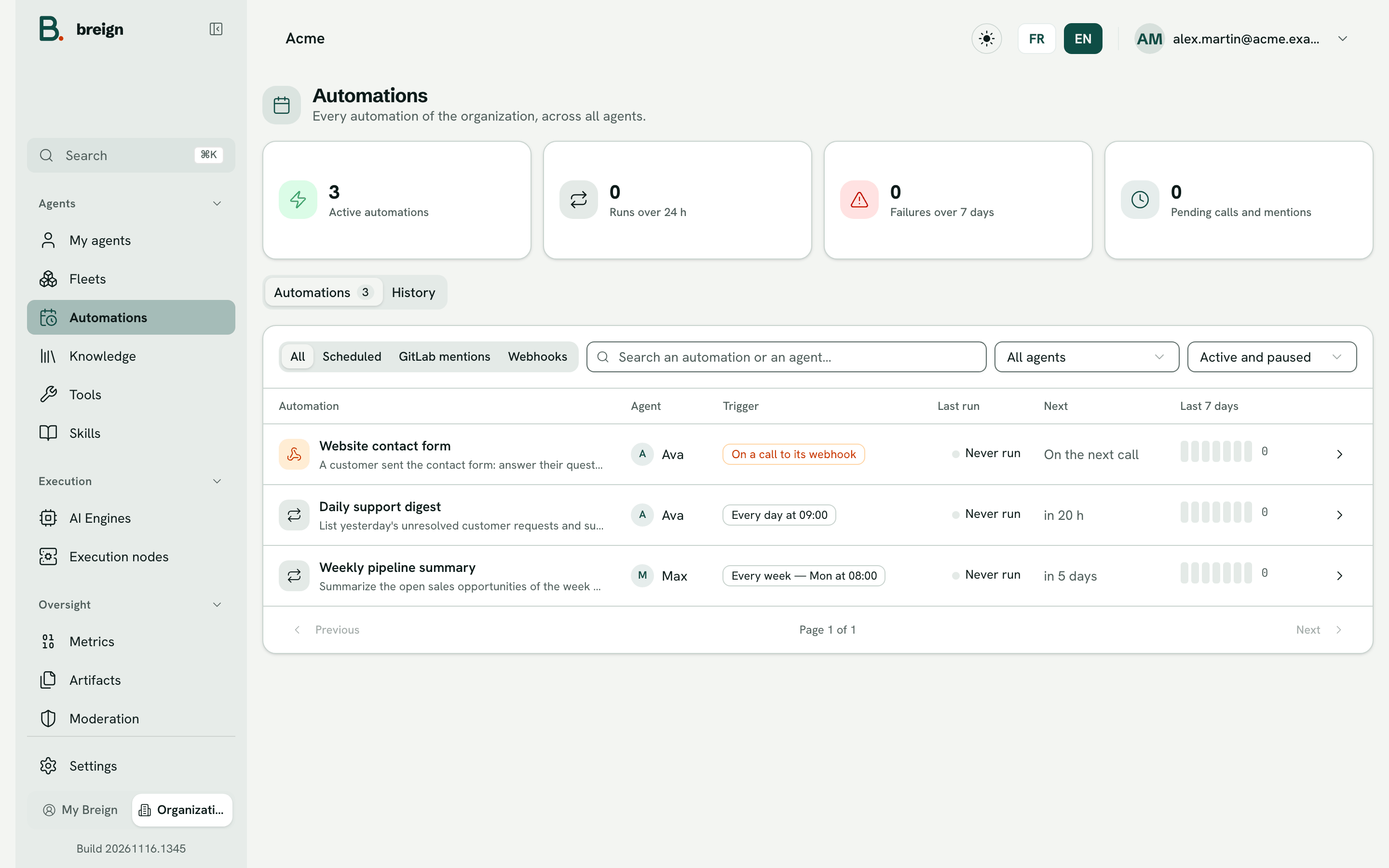
To see every automation of the organization in one place, open Automations in the Organization sidebar: it lists them across agents, with runs and failures over 7 days, a calendar, a history, and filters by trigger, agent and status.
If something goes wrong
- The automation doesn't run: check that it isn't Paused, that its recurrence hasn't ended, and that the agent is active.
- "Invalid URL (e.g. https://example.com/callback)": enter a full address.
- The cron expression isn't accepted: follow the format
min h day month weekday. - The webhook answers 401: the secret or signature is wrong. Sign the exact bytes you send, or generate a New secret.
- The webhook answers 415: send
application/json,application/x-www-form-urlencodedor text. - The webhook answers 429: too many calls in a minute. Retry later, with the same
Idempotency-Key. - A run is in Error: open it to read the error, then Continue in chat to see what the agent did.