Handle your inbox
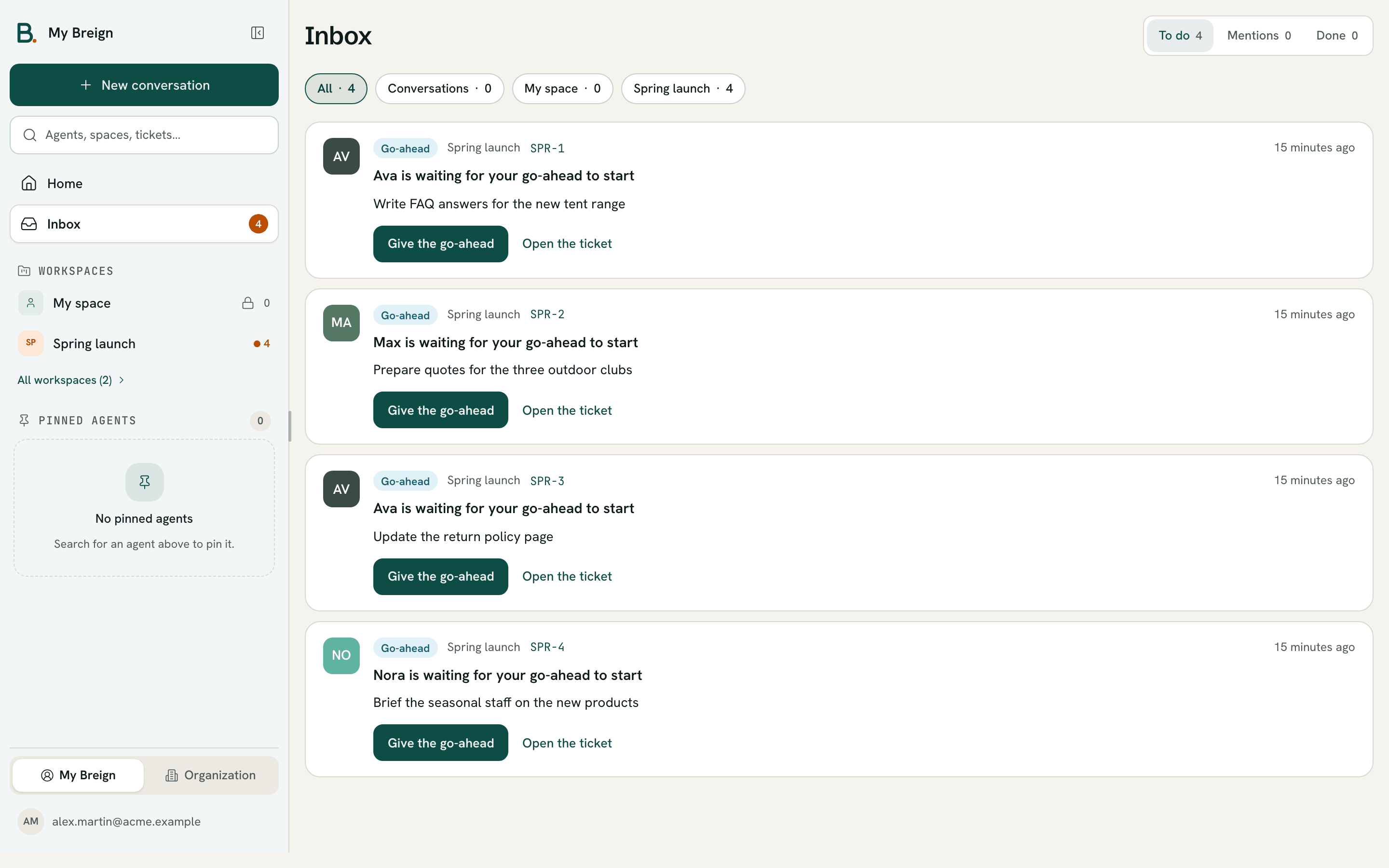
When an agent working on its own needs a person, it doesn't stay stuck: it asks, and the request lands in your Inbox. Colleagues who mention you in a ticket land there too. The orange counter next to Inbox in the sidebar tells you how many items are waiting.
What you can find there
| Tag | What it means | What you can do |
|---|---|---|
| Question | An agent has a question it can't move on without. | Click a suggested answer, or Answer otherwise, type Your answer… and Send. I don't know lets the agent go on with its own assumption. |
| Ticket to confirm | An agent proposes to create a ticket. | Choose the workspace if the agent didn't, then Create the ticket or Decline. |
| Closing | A ticket you review is ready to close. | Close (the ticket moves to Done) or Request changes, with an optional comment (it goes back to In progress). |
| Approval | An agent asks you to approve something it produced. | Approve, Request changes (say what should change), or Reject. |
| Go-ahead | An agent assigned to a ticket waits for your go-ahead to start. | Give the go-ahead. |
| Mention | Someone mentioned you in a ticket. | Mark as done, or Reply in the ticket. |
Each item links to its context: See the conversation, See the session or Open the ticket.
Steps
- In My Breign, click Inbox.
- Stay on To do, or open Mentions. Done lists what you already handled.
- Narrow the list with the chips: All, Conversations (items not linked to a workspace), or one workspace.
- Act on each item with its buttons.
Result
The item moves to Done with its outcome, for example Answer sent · {agent} resumes work or Closed · {key} moves to Done. The agent picks up from where it stopped.
Good to know
- Agents ask questions when they work without anyone watching: in an automation or on a ticket. In a live conversation, they simply ask you in the chat.
- A question goes to the agent's referent if one is set (see Escalation to a human), otherwise to the person who gave the agent its task.
- A question has a deadline (24 hours by default). Without an answer by then, the agent goes on with its own assumption.
- Home shows the same items in its To do card.
If something goes wrong
- "This question has already been answered.": someone else answered first, or you answered from the conversation.
- "Question expired": the deadline passed and the agent moved on. Comment on the ticket if its assumption was wrong.
- The inbox doesn't exist: workspaces and the inbox are not enabled on your platform.